LH-3T™
Instrumented target work.
 KAIR™-ProBITE™
MEASURABLE K9 DEVELOPMENT
Video and bite pressure.
One clear view.
Review the footage. Follow the pressure.
Save the moments worth understanding.
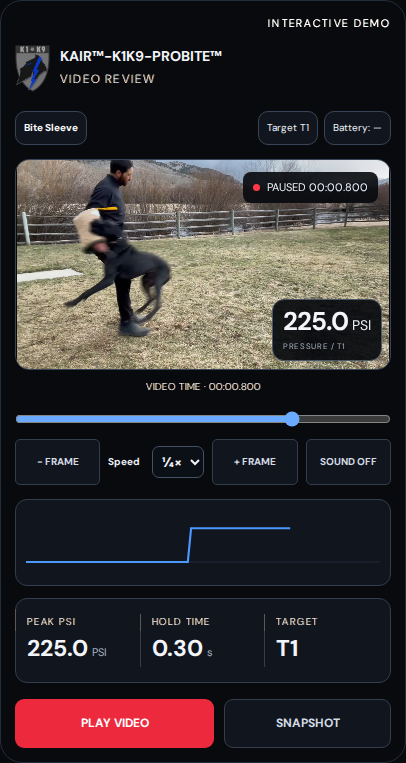
VIDEO. PRESSURE. SESSION REVIEW.
Select a feature. See exactly where it lives on the mobile screen.
KAIR™-ProBITE™FEATURE WALKTHROUGH
Keep the selected tool in view.
The video shows the engagement. The calibrated sensor assembly supplies the pressure data.
THE EQUIPMENT ECOSYSTEM
Choose the tool for the session. Keep a consistent record of the dog, target and exercise. Select an image to look closer.
Instrumented target work.
Red pillow with removable sensing sleeve.
Puppy-specific sensor. Removable carrier.
Exterior and internal sensor-carrier views.
Familiar engagement. Measurable output.
Civilian edition with front and rear sensor-placement options.
Adaptable placement on compatible implements.
Sensor fit, target mapping and calibration follow the selected equipment configuration.
A CLEAR PATH
One equipment choice follows the session. No repeated setup questions. No hunting through menus.
Choose the equipment once.
Confirm readiness and calibration.
Choose your K9, drill or test.
Review, record and compare.
Zeroing removes the unloaded offset. It does not replace equipment-specific calibration.
A RECORD THAT GROWS
Follow the same K9 across weeks, months and years of retained records.
Match the K9, equipment, position and calibration. Keep stress conditions, decoy identity and implement type beside the result.
Save notes and video references. Export records for your own archive and authorized professional review.
Readiness checks, manual stop/check controls and supported monitor cautions keep responsible handling in the workflow.
Years of review depend on records being saved, retained, backed up and migrated. Compatible monitors and reviewed settings are required for physiological cautions; software cannot physically stop activity.
THE COMPLETE FEATURE GUIDE
Browse the details when you need them. Each section explains the feature, its purpose and its configuration requirements.
Bring video and pressure into the same review workspace.
Original footage
Keep the actual dog, handler and equipment in view.
A shared timeline
Scrub video beside pressure samples. Check or adjust alignment before interpreting a moment.
Slow down. Look closer.
Playback speed, zoom and focus controls help review grip and visible movement.
Capture the discussion
Save review snapshots, or open a supplied still image as a separate reference.
225 PSI is demonstration data, not a reading from this video. Review or adjust timing alignment; frame-accurate synchronization has not been certified.
Review the video alongside the sensor readings. Use both to examine the session and plan the next training step.
Equipment
Keep the selected tool in view.
Video
Record through your mobile device’s camera.
Playback
Review speed and move between frames.
Peak + hold
Read the peak PSI and hold time together.
Target + battery
Check target identity and reported power.
PSI on video
See pressure beside the matching moment.
Pressure trace
Follow changes across the recorded bite.
Snapshot
Capture the review for a closer look.
Use your mobile device’s camera in the app to record the K9 bite while viewing live bite pressure.
225 PSI is demonstration data. Check video alignment before interpreting a bite. Live capture requires a supported, validated camera and sensor connection.
Replace a single impression with a record you can examine. Then make the next training decision with more context.
How hard?
See recorded pressure from the calibrated target assembly.
How long?
Separate a brief peak from output maintained through a hold.
How consistent?
Review repeated contacts, not just the best number of the day.
What changed?
Compare matched sessions alongside video and your observations.
Better information. More deliberate development.
A pressure trace supports professional judgment. It does not replace it.
One equipment choice follows the session. No repeated setup questions. No hunting through menus.
01 Overview
Choose gloves, pillow, sleeve, suit, band or puppy tug.
02 Calibrate
Confirm the equipment profile, device checks and unloaded zero.
03 Drill / Test
Select the K9 and exercise, or go directly to a bite-pressure test.
04 Results
See the live reading, then the session summary.
05 Bite breakdown
Review peak, hold, pressure changes and contact timing.
06 Records
Save the session, notes, files and review context.
07 Next session
Compare the work and frame the next development question.
08 Aftercare
Record observations, recovery checks and welfare concerns.
09 Maintenance
Check power, sensors, settings and equipment readiness.
10 Ask the team
Prepare a focused question with the relevant record.
Zeroing removes the unloaded offset. It does not replace equipment-specific calibration.
Choose the tool for the session. Keep a consistent record of the dog, target and exercise.
LH-3T™
Instrumented target work.
Bite pillow
Red pillow with removable sensing sleeve.
Puppy Tug
Puppy-specific sensor. Removable carrier.
Advanced Puppy Tug
Exterior and internal sensor-carrier views.
Bite sleeve
Familiar engagement. Measurable output.
KESP™ suit
Civilian suit with front and rear sensor-placement maps.
Sensor band
Adaptable placement on compatible implements.
Sensor fit, target mapping and calibration follow the selected equipment configuration.
Read the bite as a sequence: contact, peak, settling pressure, sustained hold and release.
Live PSI
The current reported pressure for the selected target.
Peak PSI
The highest recorded sample, not the whole performance story.
Hold pressure
What the dog sustains during the defined hold interval.
Contact / hold time
How long the recorded engagement and hold phases last.
Drop and leveling
When pressure falls after a peak or settles into a steadier phase.
Contact-weighted mean
Average pressure weighted by recorded contact time.
Contact count
How many qualifying target contacts the system records.
Data quality
Calibration identity, missing samples and stale readings stay visible.
PSI describes the calibrated sensor assembly and its defined area. It is not a direct measurement of total jaw strength, tooth pressure or injury potential.
Review up to four configured pressure channels. Check each target separately.
T1
Pressure
Contact
Timing
T2
Pressure
Contact
Timing
T3
Pressure
Contact
Timing
T4
Pressure
Contact
Timing
See where contact is reported.
Mapped equipment targets identify the responding sensor region. A contact pulse makes the active region easy to follow.
Compare the targets, not just the totals.
Keep peak, mean and duration separate for each channel. Peaks from different targets are not added into a “stronger bite” score.
One equipment record. Multiple measurement points.
Four channels are not the same as four independently synchronized Bluetooth devices. Physical multi-channel operation and timing require configuration acceptance; target maps do not identify individual teeth.
Developed by the K1K9-SCAD™ team. Led by STL Joseph Garcia, Senior Team Leader and K9 Handler, US-CSOG.
Experience leads. Technology makes it reviewable.
The KAIR vision grows from operational K9 experience in high-risk corrections and the U.S. prison environment. The aim is simple: bring clearer measurement to the questions that experienced handlers and canine-development specialists ask every day.
CORE Survival has documented Garcia’s pioneering work with Giant Schnauzers in corrections special operations.1
1. CORE Survival, “Giants In The Land”: Read the original article
Follow the same K9 across weeks, months and years of retained records. Preserve the conditions that make comparison meaningful.
Find the right session
Search by K9, date, equipment and session context. Keep the record connected to a real exercise.
Remember what happened
Tag stress conditions, decoy identity and implement type. Add notes, video references and questions while the work is fresh.
Compare like with like
Match the dog, equipment, position and calibration. Flag changes instead of hiding them.
Keep a portable history
Export session data and video packages for your own archive and authorized review.
Development is a history. Not a high score.
Years of review depend on records being saved, retained, backed up and migrated when needed. Unsaved browser sessions are not a long-term archive.
Use pressure as one part of a broader conditioning picture. Keep the drill, workload and recovery context beside the result.
Bite-pressure tests
KAIR sit, down and standing sequences, or a standing-only test.
Bungee + bite
Review output after a controlled resistance exercise.
Parachute + bite
Compare the bite phase after the selected running drill.
Weight work + bite
Connect a documented pulling exercise to the next measured engagement.
Sprints + bite
Review how repeated effort relates to recorded output.
Drill guidance
Equipment-aware drill pages and video slots keep instruction close to the session.
Instructional video access follows the published member library. Workload and suitability must be set by qualified professionals for the individual K9; a PSI result alone does not measure cardio fitness.
Check equipment readiness, recover from interruptions and keep the session information in view.
Battery visibility
View reported voltage and a configured percentage estimate before power becomes a surprise.
System self-check
Check configuration, zero state and storage readiness before capture.
CLEAR from the app
Clear board history while idle, with explicit confirmation and an export-first workflow.
LOG from the app
Retrieve the latest 20 completed target contacts across the channels.
Link-loss continuity
The powered board continues local event recording when the Bluetooth link drops.
Last-contact recovery
Stored checkpoints support recovery of the last saved contact state after interruption.
These firmware functions require board integration and acceptance. History is finite; link-loss recovery is not unlimited waveform buffering. Sudden power loss may lose readings after the last completed save.
Progress is never a reason to ignore the dog. The care workflow keeps checks, caution and handler action inside the session.
STOP ACTIVITY. CHECK K9.
Before the work
Confirm equipment condition, sensor readiness, hydration, recovery and suitability for the planned exercise.
When a concern appears
A manual stop/check control stays available. Supported monitor rules can trigger visible and audible caution.
Use reviewed caution points
Set heart-rate or temperature rules for the specific K9, monitor and measurement site with qualified clinical input.
Record the response
Capture the warning, acknowledgment, observations and action taken. Export the episode with the session.
Compatible monitors and reviewed settings are required. Alerts are precautionary, not diagnosis; missing data is not a healthy reading. Software cannot physically stop activity.
Give another trainer something specific to review: the dog, the exercise, the numbers and the moment that raised the question.
Trainer summaries
Prepare a concise result with target metrics, equipment, date and calibration context.
Share your results
Create a branded result card. Review it before using the device share sheet or downloading the image.
Ask a better question
Attach the relevant record and video reference to a focused coaching request.
Carry the full context
Export CSV, session JSON and combined video/data ZIP packages for permitted analysis.
Validated bragging rights start with a valid record.
Sharing options depend on installed apps and device support. A share button is not automatic publication to every platform. Coaching access and response services follow the applicable agreement.
A compact field view for the moment. A larger workspace for deeper review.
CAPTURE
REVIEW
COMPARE
Phone or tablet
Video + pressure
Desktop records
Take measurement to the training location.
The equipment, controller and supported mobile device form a portable session setup. Bluetooth handles the local sensor link; internet service is a separate requirement for online services.
Keep the workspace readable.
The black interface emphasizes the current number, selected target and essential controls. Larger displays reveal more of the trace, video and session detail.
Own the handoff.
Use exports to move the record into an authorized review or archive workflow. Keep a clear distinction between a local file and a confirmed server copy.
Native iPhone/iPad connectivity, background behavior and offline persistence require device-specific integration. Platform availability is confirmed during onboarding.
A three-level subscription structure aligns the experience with how deeply your team needs to measure, review and coach.
PERFORMANCE
Measure. Save. Know.
Pressure results
Result snapshots
K9 profiles
Record export
PRO
Understand development.
Performance features
Four-target review
Matched-session comparison
Drills and condition notes
ELITE
Master Coach Suite.
Pro features
Pressure + video timeline
Alignment controls
Combined review packages
Professional standards. Intentional access.
K1K9 access is application-based, not automatic. Approved use, licensing and responsible handling standards belong in the agreement.
Planned subscription levels. Confirm pricing, included features and services before subscribing.
Add supported monitor data to the pressure record. Each measurement keeps its own source, method and context.
Heart-rate integration
Adapter software accommodates supported monitor data. Canine suitability, attachment and reading quality require verification.
Temperature context
Record the measurement site and method. A surface reading is not automatically a core-temperature reading.
Impact-recording applications
Vest or helmet placement is an expansion path with a suitable sensor, mounting design and its own calibration.
Motion and remote coaching
IMU data, automated pose review and live remote video are future expansion options, not current pressure-board measurements.
Add capability when it adds trustworthy information.
Additional hardware and integration may be required. Impact records are not automatically medical assessments, court-ready evidence or certified protective-equipment tests.
Developed by K1K9-SCAD™: proprietary application logic, instrumented pressure sensing and a review workflow built around the K9 team.
Independent accuracy testing
K1K9 reports that the upgraded measurement equipment is undergoing independent university testing. Published validation results, supported ranges and configuration acceptance will define substantiated performance claims.
Configuration is part of the product
A valid session depends on the correct sensor assembly, calibration, firmware, device and protocol. Four-channel operation, battery behavior and video timing must be checked as a complete system.
Connected services roadmap
Planned connected services include cloud storage, account roles, subscriptions, push notifications and remote broadcasting. These require a separately configured production service.
Operational experience. Measured performance.
Final supported devices, service terms and connected features are confirmed in the release specification. Core proprietary work can incorporate standard protocols and third-party components.
For professionals
who want more from
K9 development.
Handlers. Trainers. Decoys.
Protection K9 teams.
Law enforcement and special operations.
Explore the system.
Request professional access.
KILO1K9.COM
KAIR™-ProBITE™
the science behind the protection k9
K1K9 names, marks and original materials are reserved to K1K9. No software or design licence is granted by this brochure. Reproduction or distribution requires written permission, except as permitted by law. Third-party rights remain with their owners. Product use is subject to the applicable licence agreement.
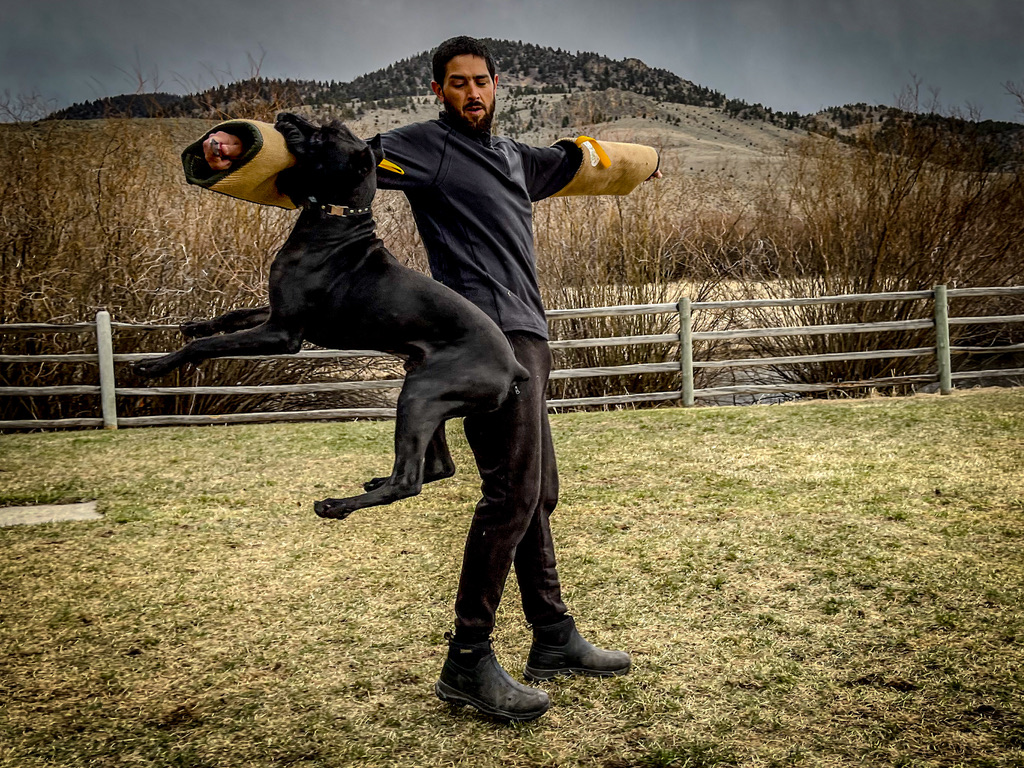
OPERATIONAL ROOTS
Developed by the K1K9-SCAD™ team. Led by STL Joseph Garcia, Senior Team Leader and K9 Handler, US-CSOG.
“one of the first non-military organizations to begin utilizing our HEL-STAR 5 Multi-Function Marker Lights.”
CORE Survival, describing US-C-SOG. Read “Giants In The Land”. This operational-history quote is not an endorsement or validation of KAIR™-ProBITE™.
PROFESSIONAL ACCESS
Performance. Pro. Elite Master Coach.
Planned subscription levels for different depths of review.
Access is application-based, not automatic. Final pricing, supported devices, included services and availability are confirmed before subscription.
Developed by K1K9-SCAD™: proprietary application logic, instrumented pressure sensing and a review workflow built around the K9 team. Final pressure-calculation and calibration review is underway.
Check four-channel operation, device connectivity, video timing and optional monitors in the intended setup. Cloud storage, subscriptions, push notifications and remote broadcasting are planned connected services requiring separate production integration.